
The best pest control software for a one-person business is the one that lets you run the office from the truck: customers book without a phone call, the chemical record is done on your phone before you leave the property, the invoice goes out when the job closes, and nothing waits for the kitchen table at night. For a solo operator who only does pest control, that points to a pest-built tool with a phone app that works without signal and a price that doesn't jump when you hire your first technician. Below is who each option fits when you are the owner, the office and the technician at once, based only on what each vendor publishes.
| Software | Best for a solo operator who | Billing model |
|---|---|---|
| PestShift | Wants the chemical record required before a job closes, online booking and invoicing in one place, with the phone app working offline | Published, priced by number of technicians, every feature on every plan |
| Fieldwork | Wants a pest-built app with device scanning and a plan made for one person | Published tiers, including a plan named Solo; office seats free |
| GorillaDesk | Wants pest-built chemical logs and route optimization from day one | Published, billed per route, so each truck is a separate charge |
| Jobber | Also runs lawn, handyman or other trades | Published plans for general home-service businesses |
| Housecall Pro | Runs several home-service trades and wants the app free on every plan | Published plans for general home-service businesses |
| QuoteIQ | Runs several trades and wants quoting and autopay bundled | Published flat tiers; chemical inventory only on the Elite tier and above |
| Briostack, PestPac, FieldRoutes | Is planning to grow into a multi-truck operation soon | Quote-only; built for scaling and larger companies |
PestShift wrote this; picks are from each vendor's public docs.
Competitor facts come from vendor pages checked on October 8, 2026, and our comparison research; anything unstated is left out. If you have a few technicians already, the best pest control software for small businesses is the better read. If you are not licensed or set up yet, start with how to start a pest control business.
What does a one-person pest control business need from software?
When you are the whole company, nobody is in the office to answer the phone, write up records or chase invoices. Whatever the software doesn't finish on site lands on your evening.
| Solo job | What good software does | What happens without it |
|---|---|---|
| Take a new booking | A booking page customers use while you're working | The call goes to voicemail and the customer rings the next company |
| Keep recurring customers on the calendar | Service plans that put a year of visits on the calendar | Quarterly customers slip because nobody booked the next visit |
| Get through the day | Today's stops in order on your phone, with gate codes and notes | You keep the route in your head and the codes in a notebook |
| Record the application | Required fields on the phone: product, EPA registration number, amount, target pest, area | Records written from memory at night, or not at all |
| Get paid | An invoice when the job closes, card payment from a link | A stack of jobs nobody has billed |
| Stay licensed | Your license and renewal date tracked | The renewal date lives on a sticky note |
The record row matters most: nobody else will notice a missing record. Pesticide application record keeping covers the fields most states expect.
How should a solo operator judge pricing?
Prices change, so this page skips them. What matters for a one-person shop is the billing model, because it decides what happens the day you hire.
- Per route or per truck. GorillaDesk bills each route separately, so a second technician on the road adds a second route charge (GorillaDesk pricing).
- Per tier of technicians. PestShift prices by how many technicians you have, with the smallest plan for one technician, and every plan gets every feature. Office users are free. See pricing.
- Feature tiers. QuoteIQ puts chemical inventory tracking on its Elite tier and above (QuoteIQ pricing). If a feature you need for compliance is only on a higher tier, price that tier, not the entry plan.
- Quote-only. PestPac, FieldRoutes and Briostack don't publish prices, per our comparison research. A sales call is the first step.
For the full picture, including payment processing and setup fees, read pest control software cost. The question to ask every vendor is the same: what will I pay with one technician, and what will I pay with two?
PestShift
PestShift is built only for pest control. For a solo operator, the useful part is that the office jobs happen while you're in the field instead of after it.
Customers request a visit from your own booking page. They pick a service, see its price and length, give their address and access notes, and choose an open time. The request lands on your calendar and you're emailed. You confirm it when you get back to the truck, and that's when the customer gets their confirmation, so nobody is promised a time you can't keep. If card payments are set up, the page can take a deposit on services where no-shows cost you.
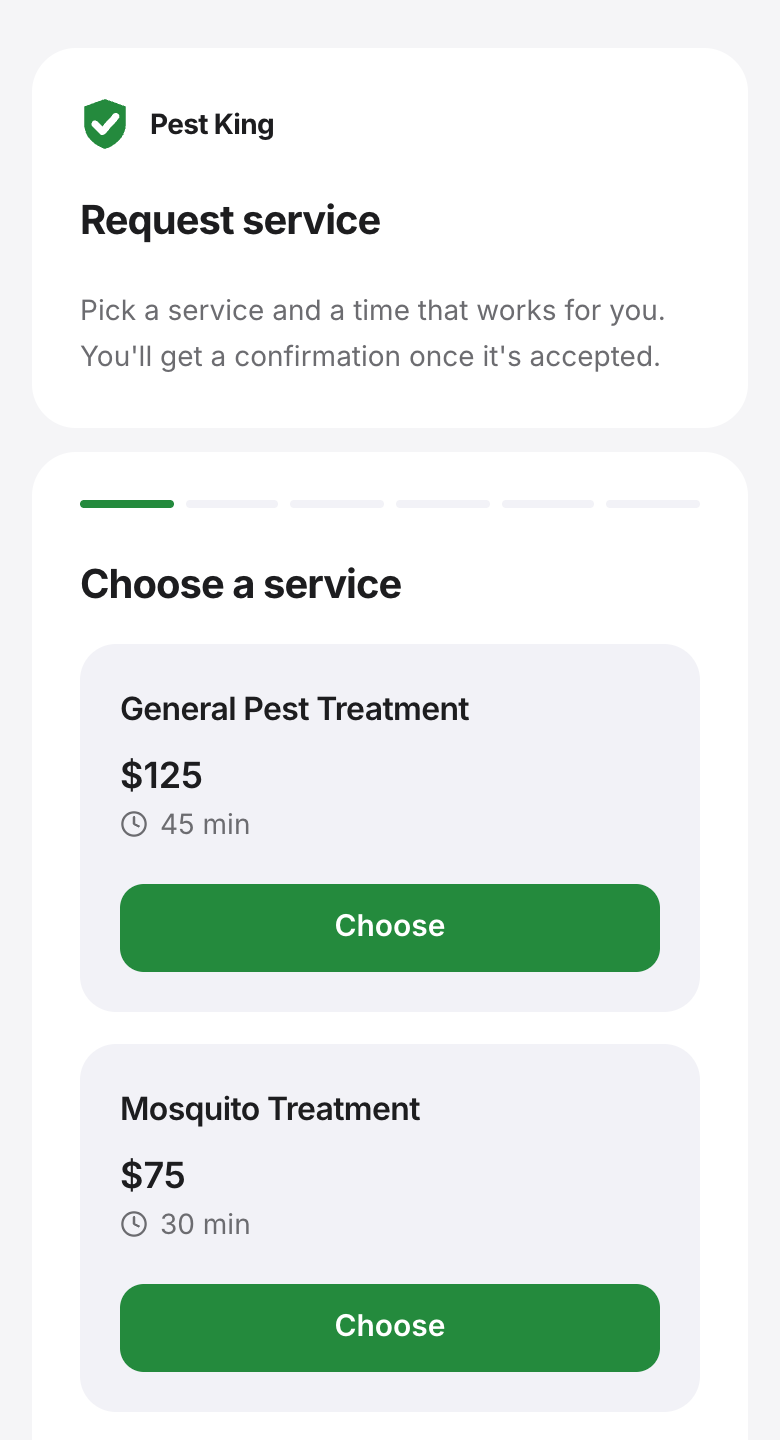 The booking page a customer opens from your website or Google profile. (demo data)
On site, My day shows your stops in order with the address, access notes and what was applied there last time. On a service that requires a record, the phone pre-fills the last product used at that property and leaves the amount to enter, and by default the job can't close until the record exists. Once My day has loaded with signal, you can start and complete visits, fill in records and add photos with no signal, and it syncs when you're back in range.
When the job closes, PestShift makes the invoice. Customers pay by card from the invoice link, and the money goes to your own Stripe account. Cash and checks are marked paid by hand. Recurring customers go on service plans that keep 12 months of visits on the calendar, and they can save a card for autopay.
The owner also gets Ask PestShift, an assistant built into the app. A new customer calls while you're under a house; back in the truck you type one sentence with their name, address and "quarterly general pest plan", check the card it shows, and tap Confirm. Nothing changes until you confirm, and it never writes chemical records. Moving over from a spreadsheet or a notebook is free: send us the list and we import it.
Demo test: start a free trial, share your booking link with a friend, and have them request a visit. Then complete that visit on your phone in airplane mode, reconnect, and check that the record and the invoice are both there.
Fieldwork
Fieldwork is pest control software with published tiers, including a plan named Solo, and office seats are free, per our comparison research (Fieldwork pricing). The mobile app is on every plan. Its homepage lists chemical tracking and device scanning, and says you can "keep information like ratios available offline for your teams in the field" (Fieldwork). Reviewers and industry writeups call out reliable offline access as a strength.
Demo test: ask what changes on the bill when you move from the Solo plan to two technicians, then complete a job on the phone in airplane mode with a full chemical record.
GorillaDesk
GorillaDesk serves pest control and nearby trades with published, month-to-month pricing billed per route (GorillaDesk pricing). Route optimization is on every plan, with Basic capped at 25 stops per route, and the Pro plan adds device tracking with barcodes and a customer portal. Our comparison research found it logs the EPA registration number, active ingredients, dilution rates, application method and target pest per job, and that its offline mode is read-only according to its help center.
At one truck, check the 25-stop cap against your busiest day. GorillaDesk alternatives covers who tends to move away and why.
Demo test: ask them to complete a job with no signal. If the app is read-only offline, find out where the record goes until you're back in range.
Jobber
Jobber is general field service software with a pest control page. It lists iOS and Android apps, chemical records with applicator license numbers, a client portal and route optimization (Jobber pest control). It suits a solo operator who also runs other trades. On the pages checked for Jobber for pest control, offline support was not stated.
Demo test: ask them to close a job on the phone with the chemical record empty. If it closes, your records depend on your memory at the end of a long day.