
The best pesticide tracking software is the one that makes a complete application record part of closing the job and hands every record back to you as a file when an inspector asks. For multi-state companies that need state forms generated, PestPac has the deepest built-in reports; for California use reports, Briostack; for bait stations and devices, Fieldwork or GorillaDesk; for a small shop that wants no job to close without its record, PestShift. A paper log or spreadsheet still works if you have one truck and real discipline.
| Best for | Pick | Why |
|---|---|---|
| Records that can't be skipped | PestShift | A job can't close until its chemical record exists, on the services you choose |
| Multi-state compliance reports | PestPac | State-specific exports built in, per our comparison research |
| California use reports | Briostack | Direct CalAg report submission, per our comparison research |
| Bait stations and devices | Fieldwork | Chemical tracking plus device scanning, listed on its homepage |
| Published, pest-focused logging | GorillaDesk | Per-job chemical logging and a usage log on demand |
| High-volume recurring routes | FieldRoutes | Mobile chemical-usage logging that feeds office reports |
| A general field service tool | Jobber | Chemical records with applicator license numbers on its pest page |
| Inventory more than records | QuoteIQ | Lists "Products, chemicals and stock" on its pest page |
| One truck, no budget | Paper or a spreadsheet | Free, if you never skip a line |
PestShift wrote this; picks are from each vendor's public docs.
I run PestShift, so read the PestShift section with that in mind. Vendor facts below come from each vendor's own pages, checked October 8, 2026, or from our comparison page, compiled in 2026 from vendor pages and reviews. If neither said something, it is left out.
This list ranks one thing: how well each tool keeps pesticide application records. If you want the wider view (scheduling, billing, routing), read best pest control software for small businesses. If you want to know what a record system should capture before you look at any vendor, start with pesticide record keeping software: what to look for.
How we ranked pesticide tracking software
Every tool on this list says it tracks chemicals. That phrase covers very different things, from a product list on an inventory screen to a full application record that blocks a job from closing. We ranked on five questions:
- Is the record part of the job? Does finishing the visit produce the record, or is it a separate form someone fills in later?
- Can a technician skip it? The most common inspection gap is a job with no record at all. See what inspectors check in a record audit.
- Are the fields structured? Product, EPA registration number, rate, amount, target pest and site should be fields, not a notes box.
- Can you get it out? Every record, for any dates, as a file you keep.
- Does it produce state reports? A few states want a report filed, not just records kept.
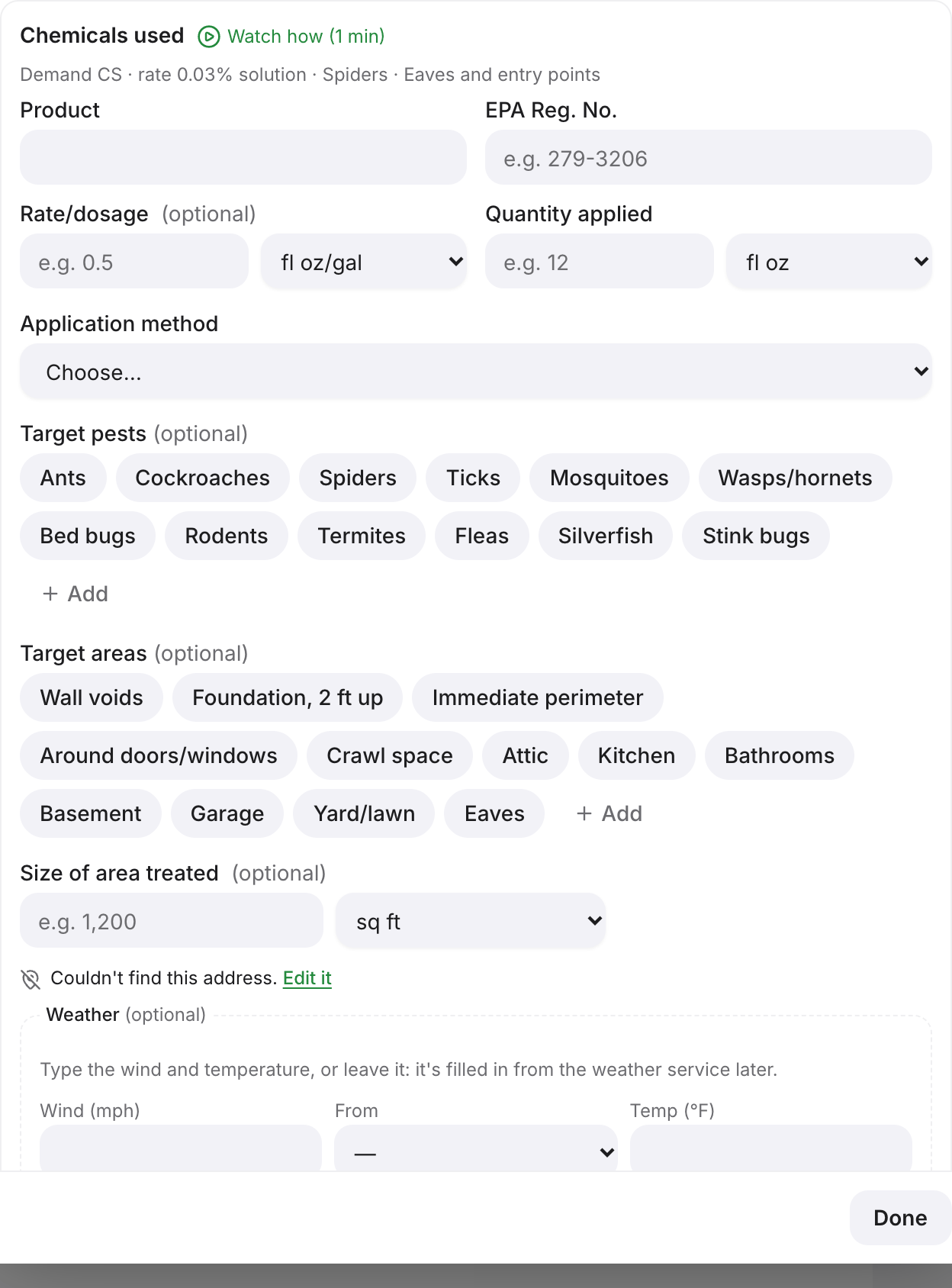 The chemical record form on a visit in PestShift. (demo data)
1. PestShift: best when records can't be skipped
PestShift records each pesticide application as part of the job. By default a job can't be marked complete until its chemical application record exists. You set which services need one (Always, Never for inspections that apply nothing, or the business default), and which fields are required, such as rate, quantity or method.
Each record holds the product name and EPA registration number, the rate and quantity applied, the application method, target pests and target areas, who applied it and when, and the weather at the property at that time. The weather comes from the National Weather Service for US properties and is saved automatically. A product library keeps your products with their EPA numbers, and the technician's phone shows what was applied at that property last time.
Records are add-only: a correction is saved as a new record next to the original. Technicians can fill in records with no signal in the technician app, and they sync when the phone is back in range. Every application record exports as a spreadsheet for any dates, plus an annual usage report with a county summary. For New York businesses, PestShift builds the DEC annual pesticide report from your records; more in New York pesticide record keeping.
Demo test: Start a trial, set a service to require a record, and try to complete a visit with the record blank. It should refuse. Then export the record and check every field is in the file.
What PestShift doesn't do
- No state forms outside New York. Elsewhere you export records as a spreadsheet and file yourself. Nothing is sent to any state for you, New York included.
- The same required fields apply in every state. Per-state rules beyond New York are not built in, so check your state's list against your settings.
- No bait station or barcode tracking. If you service devices, Fieldwork or GorillaDesk fit better.
- No CalAg submission. California use reporting is Briostack's strength, not ours.
- License flags warn, they don't block. A missing chemical record stops a job; a lapsed license only flags it.
2. PestPac: best for multi-state compliance reports
PestPac lists chemical tracking on its homepage, which pitches the platform at "enterprise leaders". From our comparison research: PestPac captures the EPA registration number, concentration and application data per job, with state-specific compliance exports built in. The examples we found were California Material Reports, Cal-Ag and Arizona TARF. Our research also found PestPac Mobile marketed with full native offline mode, where chemical logging works with no signal and syncs on reconnect.
If you operate in several states and need specific state forms generated for you, PestPac has more built-in coverage than most tools here, including ours. It is quote only, so you will go through a sales process first. FieldRoutes vs PestPac covers how it sells.
Demo test: Ask them to generate the exact state report you file today from a week of sample jobs, and to show which plan or module that report sits in.
3. Briostack: best for California use reports
From our comparison research, Briostack offers chemical usage tracking with barcode scanning, digital documentation with e-signatures, and direct CalAg report submission for California operators. Its pest control software page talks about plans for "businesses of all sizes" and asks you to contact them.
If you file California pesticide use reports, built-in CalAg submission is a real, narrow advantage. Outside California, judge it on the same record questions as everyone else. Briostack vs GorillaDesk compares it with a published-price alternative.
Demo test: Have them complete a job, scan a product, and show the CalAg submission for that job, then show what happens if the technician leaves the record blank.
4. Fieldwork: best for bait stations and devices
Fieldwork's homepage lists chemical tracking and device scanning in its features menu. From our comparison research: pest-control-specific chemical tracking and trend reporting, barcode scanning for traps and stations, and canned compliance reports available through a customer portal. The same research found reviewers calling out reliable offline mobile access.
If your work includes commercial accounts with bait stations and monitoring devices, device scanning tied to chemical tracking is worth a lot. In the demo, check the report output, not just the screen.
Demo test: Scan a station, record a bait application on it, then run the compliance report for that account and read every column.
5. GorillaDesk: best published, pest-focused logging
GorillaDesk's homepage says you can "Track your materials and chemicals applied on the job site". From our comparison research: it logs the EPA registration number, active ingredients, dilution rates, application method and target pest per job, and can produce a pesticide-usage log on demand. Its pricing page lists device tracking with barcoding on Pro and up, and says plans are month to month with no contracts.
GorillaDesk is closer to a pest-specific record system than most generalist tools. The question to settle is whether a record is required, or only available.
Demo test: Complete a job with no chemical entered and see whether it closes. Then pull the usage log for that week.