Pest control chemical tracking software that keeps every record complete
PestShift records each pesticide application as part of the job, not as paperwork afterwards. Your technician fills in the product, EPA registration number, amount and where it went, and the job can't be marked complete until the record is there.
14-day free trial
What it does
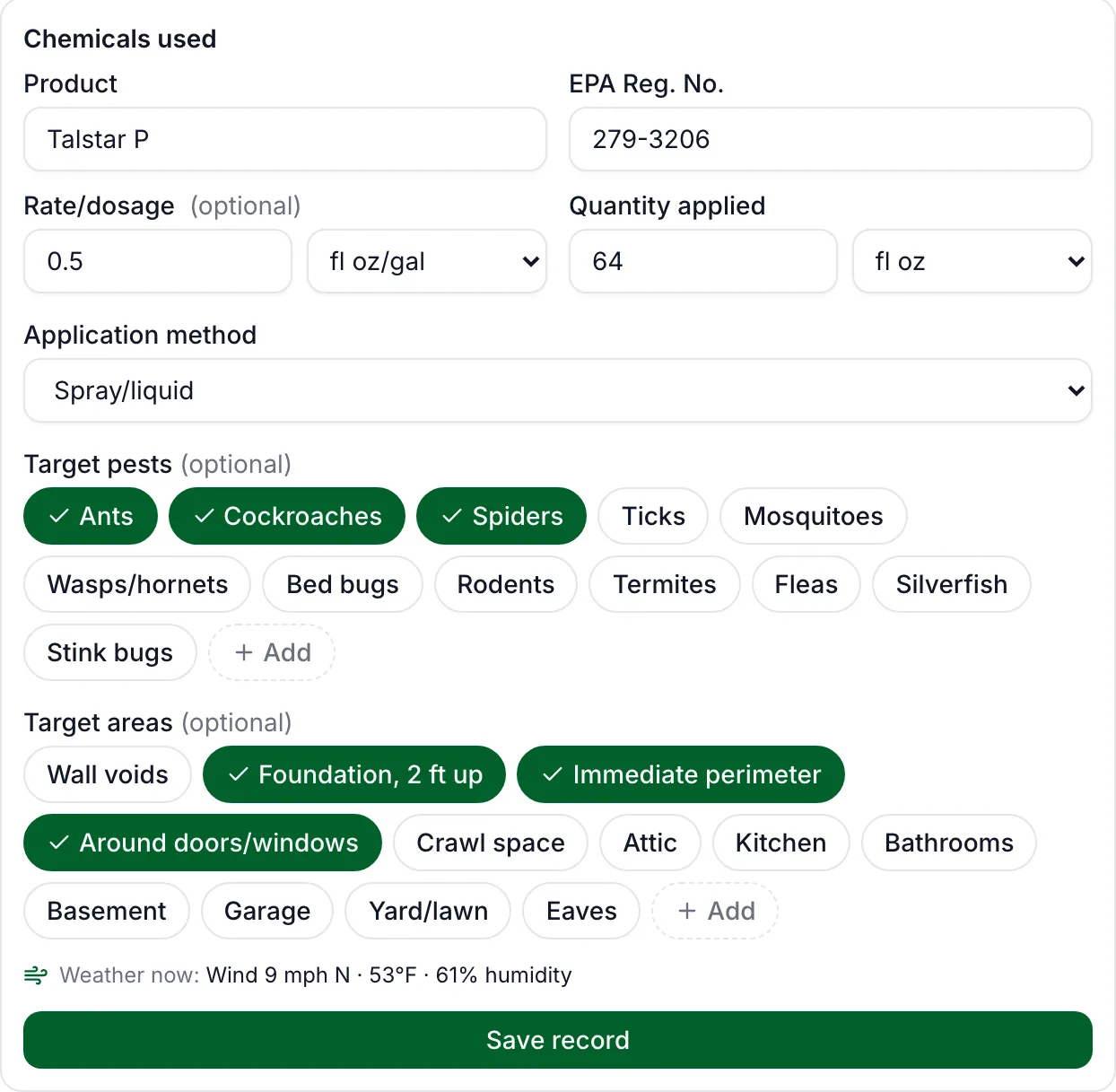
Every visit that applies a product gets a chemical application record. It holds the product name and EPA registration number, the rate and the quantity applied, the application method, the target pests and target areas, who applied it and when, and the weather at the property at that time.
By default a job can't be completed until that record exists. You choose which services need one: set a business default, then mark each service as Always, Never (for inspections that apply nothing) or Use business default. You also choose which fields are required, such as rate, quantity or method.
How it works on the job
Technicians fill in the record from their phone when they complete the visit, or the office adds it from the visit on the calendar. Product and target choices are tap-to-pick, and the app shows what was applied at that property last time, so a repeat treatment takes seconds. On a service that requires a record, the phone pre-fills the last product used there and leaves only the amount to enter.
Records are add-only. A correction is saved as a new record next to the original rather than overwriting it, and a visit that has a record can be cancelled but not deleted. That is what you want when an inspector asks to see what happened on a given day.
- Product library: save the products you use with their EPA numbers, so nobody types them twice.
- Label and SDS PDFs attached to the visit, up to 10 per visit.
- Chemicals shown on the invoice and the service report, with product, EPA number, amount, applicator and license. You can turn this off.
- Exports any time: every application record as a spreadsheet, for any dates, plus an annual usage report with a county summary.
New York's annual report, filled in for you
For New York businesses PestShift builds the DEC annual pesticide report (form 44-15-26) from your records: one sheet per applicator, one row per application, with units and county codes converted to the state's format. It lists any rows that are missing something before you submit, then lets you copy the rows straight into the state's Excel form, or download them. Quantity applied is required automatically for New York businesses, because the state report needs it. Nothing is sent to the state for you; you stay in control of the filing.
Who it's for
Owner-operators and small teams who apply restricted or general-use products and need records they can hand over without a scramble. If your records live in a notebook, a spreadsheet, or a notes field in software that was never built for pest control, this replaces all three.
Being able to copy my chemical records straight into the New York state report saves me 5-10 minutes per job. None of the other apps did that.
Questions, answered
- Product name, EPA registration number, rate, quantity applied, application method, target pests, target areas, the applicator, the date and time, the property and the weather at the time. You choose which of rate, quantity, method, pests and areas are required.
- Not on a service that requires one. The requirement is on by default and you can set it per service, so inspections or other no-chemical work can skip it.
- Yes, by adding a corrected record. The original stays, so the history is complete. A missing amount can also be added later on an open visit, and the record shows who added it and when.
- No. For New York it prepares the DEC annual report in the state's format so you can paste or upload it. Other states get the spreadsheet exports, which have the fields their reports ask for.
Try PestShift free for 14 days
Chemical tracking & records comes with every plan, from $39 a month. Setup takes about 10 minutes, and we'll import your customers for you, free.
14-day free trial