Pest control scheduling software for the office and the truck
One calendar with every job and every technician on it. Book a visit in a few taps, see who's free, move a job to another day by dragging it, and let the reminders go out on their own.
14-day free trial
What it does
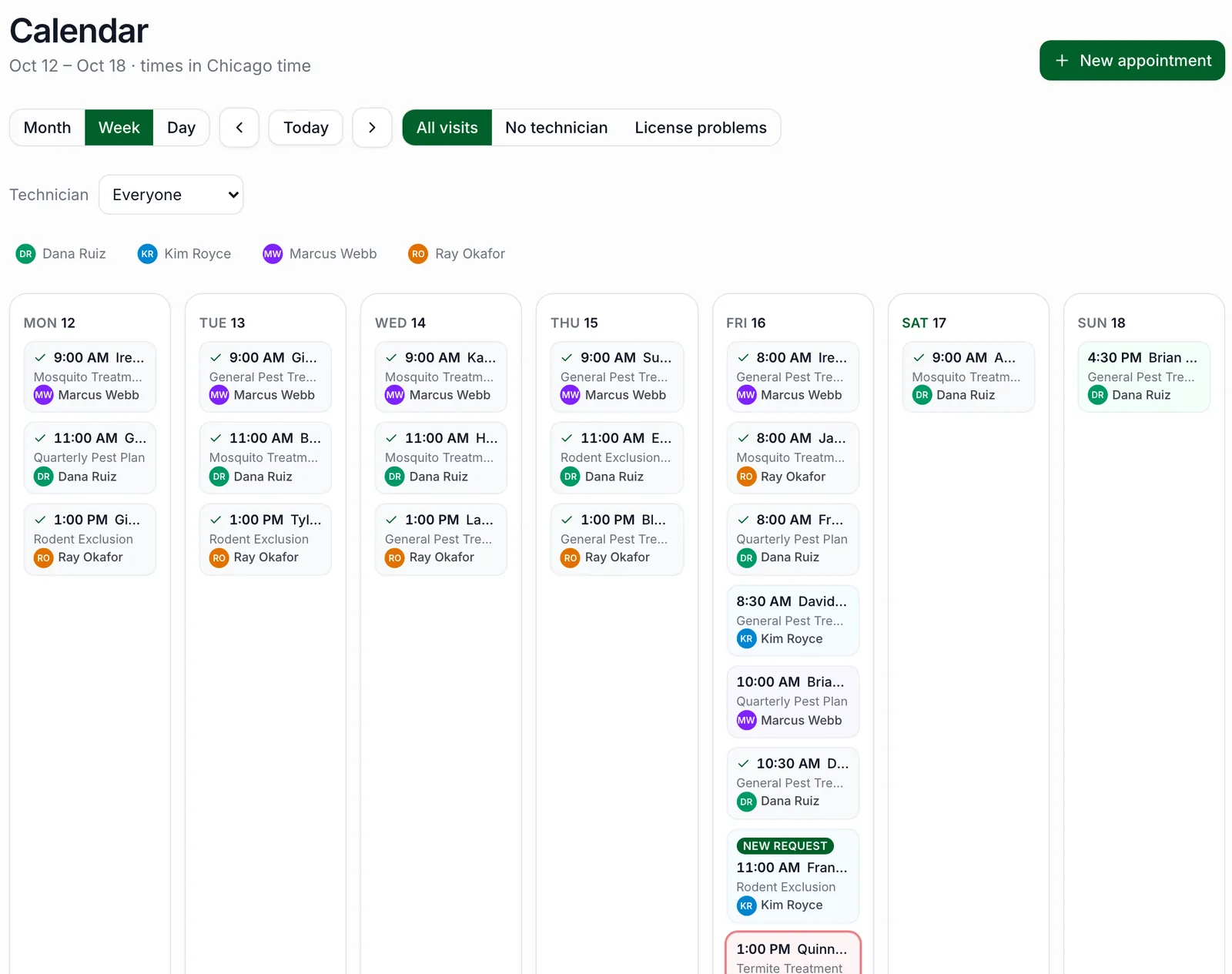
The calendar shows your month, week or day. Each visit is colored by technician, with their photo or initials, so you can read the day at a glance. Filter to one technician, to visits nobody is assigned to yet, or to visits with a license problem. Requests from your online booking page are marked so they don't get missed.
To book a visit, search for the customer or add a new one, pick the property, the service and any add-ons, then the date, time and technician. The price comes from the service and you can change it for this visit. PestShift won't let you double-book a technician, and it checks their license for the service while you're booking.
Dispatch, reminders and follow-up
Drag a visit to another day to move it, at the same time. Reassign it to another technician from the visit. Each visit moves from requested to confirmed to completed, or cancelled or no-show, and payment is tracked separately.
Customers get an email confirmation when you confirm a visit and an email reminder the day before. After the visit, they get the service report your technician wrote, with notes, photos and the products applied, or a simple thank-you if there wasn't one. You can pause all automated customer emails in Settings.
- Month, week and day views
- Drag and drop to another day
- Unassigned and license problem filters
- Email confirmations, reminders and service reports
- Recurring visits from your service plans, already on the calendar
Everything about a visit in one place
Click any visit to open it. The customer and property, the technician, status and price are at the top, followed by the deposit and payment, the chemical record, the route it's on, and the completion report with notes, photos and recommendations. From the same window you can reschedule, reassign, cancel, or open the invoice.
Who it's for
Owner-operators who book their own work between jobs, and small offices dispatching a handful of technicians. It's fast enough to use on a phone in the truck and clear enough to run the office from a laptop.
Good to know
Reminders and follow-ups go by email; PestShift doesn't send text messages today. You assign technicians yourself: the routing tool puts each technician's day in a good order, but it doesn't decide who gets which job.
Questions, answered
- Yes. Drag a visit to another day on the calendar and it keeps its time. Completed and cancelled visits stay put.
- Yes, by email: a confirmation when you confirm the visit and a reminder the day before. Text message reminders aren't available today.
- Yes. Each technician gets My day on their phone: today and the next two days, in order, and it works without signal.
- Yes. A technician can't be booked for two visits at the same time.
- Yes. Filter the calendar to one technician, to unassigned visits, or to visits with a license problem.
Try PestShift free for 14 days
Scheduling & dispatch comes with every plan, from $39 a month. Setup takes about 10 minutes, and we'll import your customers for you, free.
14-day free trial