Pest control invoicing software that shows who still owes you
Finished work that nobody has billed is money left in the truck. PestShift makes an invoice for every completed visit, shows you what hasn't been sent, and lets customers pay by card from a link, straight to your bank.
14-day free trial
What it does
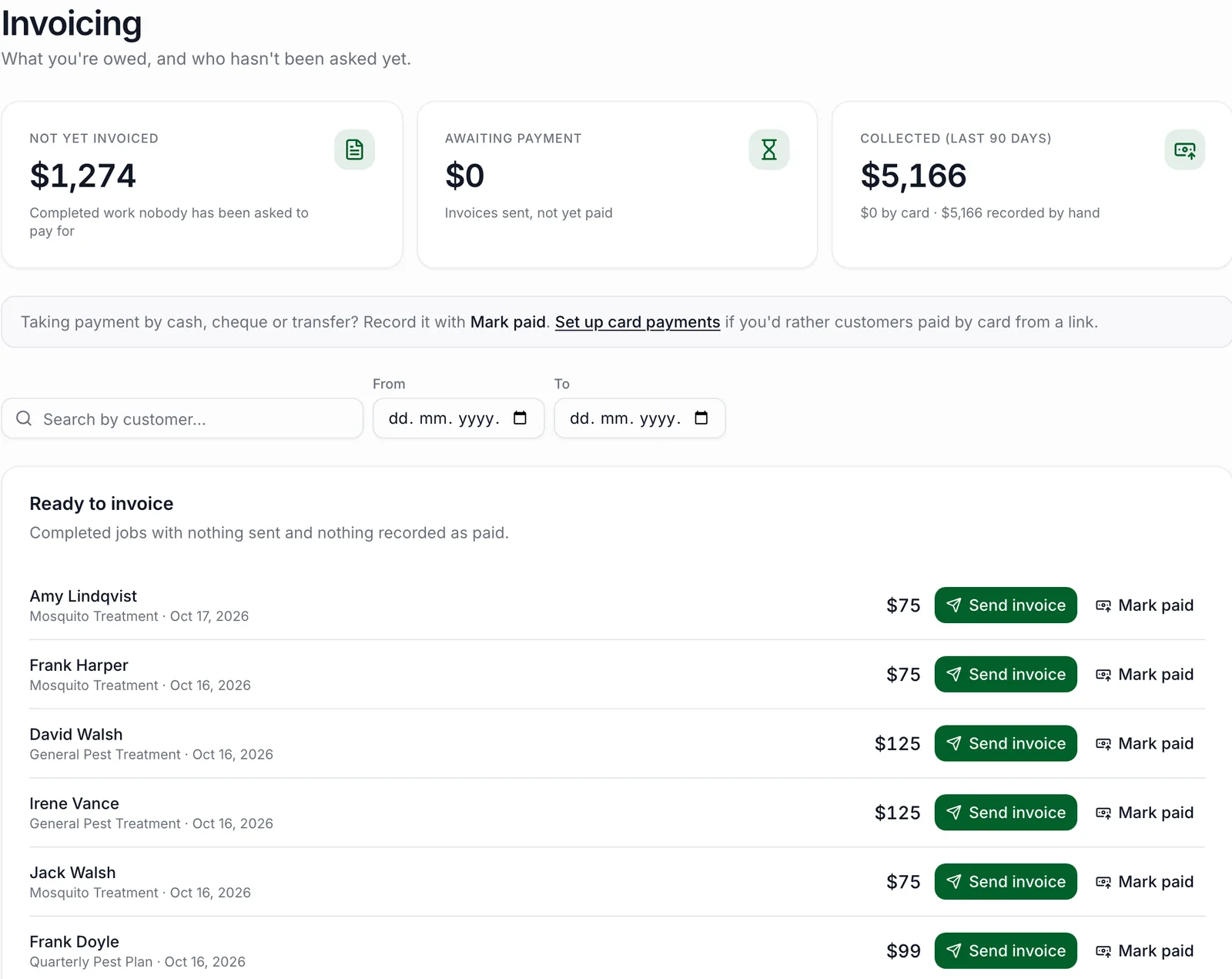
Every completed visit gets a numbered invoice. The Invoicing page splits your money three ways: completed work not yet invoiced, invoices sent and awaiting payment, and what's been collected, by card or in person. From the list you can send an invoice or mark a job paid in one tap.
Each invoice can include sales tax (set your rate, mark which services are taxable and which customers are exempt), a warranty line, your payment terms and how-to-pay instructions, photos from the job, and the chemicals applied. Customers get it by email with a link to view, save as PDF and pay.
Getting paid by card
Card payments run through Stripe. You connect your own Stripe account in a few minutes, and the money goes straight to your bank, not through us. Customers pay from the invoice link on any phone. PestShift marks the invoice paid when Stripe confirms the payment.
Deposits work the same way. Set a default deposit on a service and your online booking page collects it when the customer books. For phone bookings, email the customer a deposit request from the visit, or note a deposit you took yourself. The final invoice subtracts a deposit only once it's actually been collected.
- An invoice per completed visit, numbered automatically
- Send by email, or copy the link to send however you like
- Card payments and deposits paid to your own Stripe account
- Cash and check marked paid by hand, by the office or the technician
- Invoice links customers open on any phone, with no login
- Unpaid invoices editable before or after sending; paid ones locked
- Spreadsheets for sales, visits and sales tax for your accountant
Who it's for
Operators who bill per visit and want fewer jobs slipping through unpaid. If you're writing invoices in a separate app after the day is done, this does it as the job closes.
Good to know
Stripe charges its usual card fees, and PestShift adds a 1% platform fee on card payments. PestShift doesn't sync with QuickBooks or other accounting software today; you export spreadsheets instead. It also doesn't charge saved cards automatically, so there's no autopay: customers pay each invoice from its link.
Questions, answered
- Straight to your own Stripe account and from there to your bank. PestShift doesn't hold your money.
- Stripe's standard card fees, plus a 1% PestShift platform fee on each card payment.
- Not today. You can download your sales, visits and sales tax as spreadsheets for your accountant.
- Yes. Online bookings can require a deposit when card payments are set up, and for other bookings you can email a deposit request or record one you collected yourself.
- Yes. The invoice link has a save as PDF option, and you can save the same PDF from the invoice page.
Try PestShift free for 14 days
Invoicing & payments comes with every plan, from $39 a month. Setup takes about 10 minutes, and we'll import your customers for you, free.
14-day free trial