Pesticide applicator license tracking for your whole team
A technician whose license lapsed last month shouldn't be on tomorrow's termite job, and you shouldn't find out from an inspector. PestShift keeps every applicator license in one list and checks it against the work on your calendar.
14-day free trial
What it does
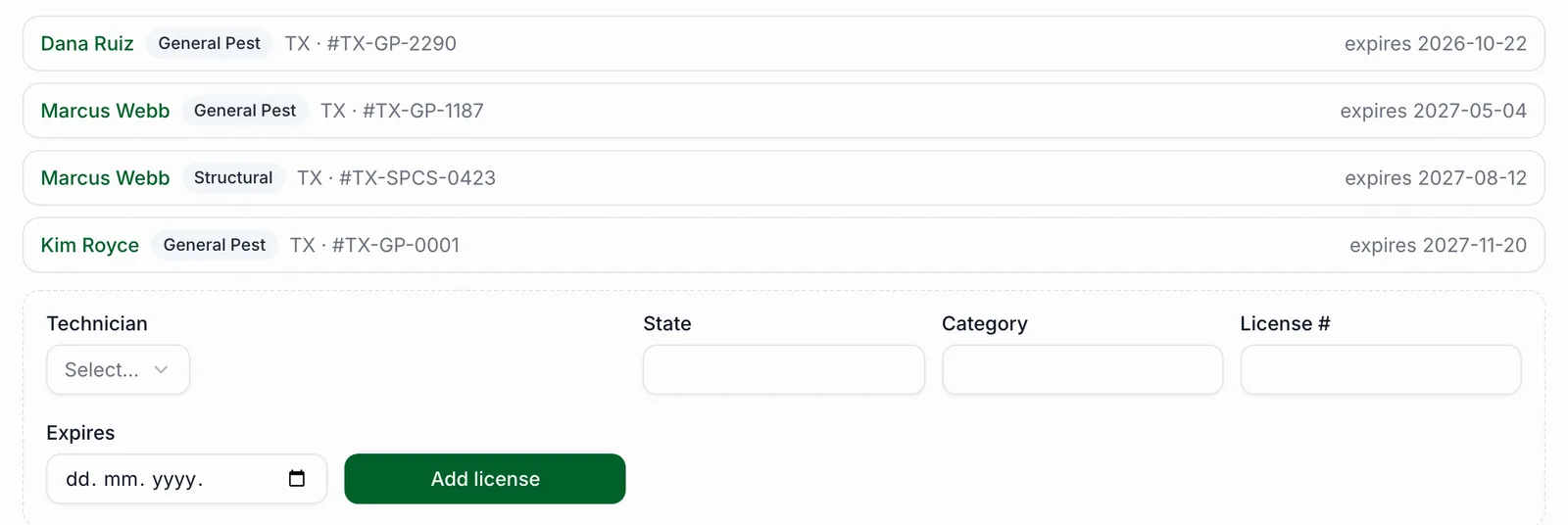
For each technician you add their licenses: state, category (General Pest, Structural, Termite, whatever your state calls it), license number and expiry date. Each service can name the license category it needs. When a visit is booked, PestShift checks that the assigned technician holds a current license in that category.
Visits get a simple flag. Red means the technician has no license in that category, or it will have expired by the day of the visit. Yellow means it expires soon (30 days by default, and you can change the window). Green means you're covered.
How it works day to day
The check runs when you book a visit, when you reschedule or reassign it, and again every morning for the next 30 days of work, so a license that runs out next week shows up before next week. The calendar has a License problems filter that shows only the flagged visits, and your Home screen lists them.
Flags warn, they don't block. If you book a flagged visit anyway, PestShift asks you to confirm and notes that you did. What actually stops a job from closing is a missing chemical record, not a license flag. That's on purpose: you know your crew and your state's supervision rules better than software does.
- Expiry reminder emails to the technician when a license enters the warning window, at most once a week
- A Remind button on Home to nudge someone yourself
- The applicator's license shown on invoices and in the annual usage report
Who it's for
Any shop with more than one applicator, and solo operators who'd rather not keep their renewal date on a sticky note. If you've ever checked a wallet card in the truck before sending someone out, this is that check, done for you every day.
Good to know
License categories are matched by name, so use the same wording on the license and on the service. Reminder emails go to technicians who have a login email; a technician added by name only won't get one, but their flags still show for you. The rules are the same in every state today: PestShift doesn't yet know each state's own category rules.
Questions, answered
- It warns you and asks you to confirm, and records that you did. It doesn't block the booking.
- 30 days before expiry by default. You can change the warning window in Settings.
- The technician whose license is expiring, if they have a login email. You also see it on your Home screen and can send a reminder from there.
- Yes. Each license has its own state, so a technician licensed in two states can have both on file.
- On the Services page, under Applicator licenses: pick the technician, then add the state, category, license number and expiry date.
Try PestShift free for 14 days
License tracking comes with every plan, from $39 a month. Setup takes about 10 minutes, and we'll import your customers for you, free.
14-day free trial