An AI assistant for your pest control business that asks before it acts
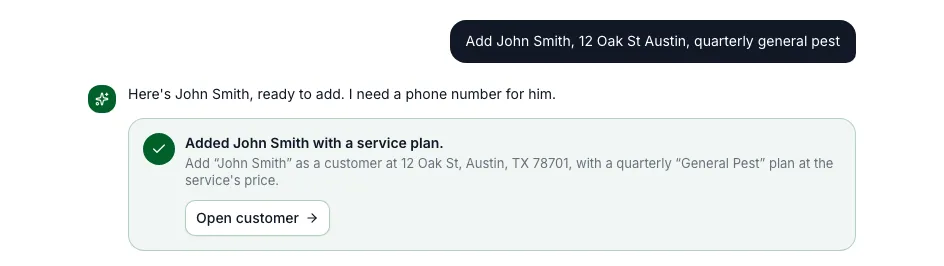
Ask PestShift is built into the app. Type or say what you need, like "add John Smith at 12 Oak St on a quarterly general pest plan" or "who owes me money?", and it does the legwork. Anything that would change your data shows up as a card first, and nothing happens until you tap Confirm.
14-day free trial
What it does
Open Ask PestShift from Home, from the menu, or with Ask AI on the Customers page. It can add a customer with their address and service plan from one sentence, book, reschedule or cancel a visit, assign a technician, set an arrival window, set up a service plan, draft an estimate or an invoice, mark an invoice paid, draft an email to a customer, and add service notes.
Questions about your numbers come back as tables: who owes you money, what's due this week, revenue by month or by service, and customers with no visit in the last 90 days.
- Every change is a card with Confirm, Edit and Cancel
- Estimates and invoices are drafted, not sent; emails go only when you press Send
- Answers about money and customers as tables
- Saved chats you can reopen, rename or delete
- Speak instead of typing, in browsers that support it
Safe by design
A confirmed card goes through the same checks as doing it by hand: double bookings are refused, technician licenses are checked, and the assistant can only touch your own business's data. Each confirmed action is logged with who confirmed it and when, and a card can only run once.
It never writes chemical application records. Those stay with the technician who applied the product.
What it looks like in a day
A new customer calls while you're under a house. Back in the truck, you tell Ask PestShift: "add Maria Lopez, 512 555 0142, 88 Cedar Lane, on a quarterly general pest plan". It shows one card with the customer, the property and the plan. You check it, tap Confirm, and the plan's visits are on the calendar.
At the end of the week you ask who still owes you money, and get a table of unpaid invoices with amounts and how long they've been open. Ask it to draft a friendly payment reminder to one of them, read the email, change a line, and press Send when it reads right.
Your chats stay in the history, so you can come back to one later and pick up where you left off. Each card shows whether it was confirmed or cancelled.
Who it's for
Owners who run the business from their phone between jobs and would rather type one sentence than fill in three forms. The assistant is for the owner's login; office staff and technicians use the app as usual.
Questions, answered
- No. Anything that would add, change or send something appears as a card first, and it only happens when you press Confirm.
- No. It drafts estimates, invoices and emails. Sending is a separate step you take.
- No. Chemical application records are always entered by the technician or the office from the visit.
- The business owner. It's included in every plan.
Try PestShift free for 14 days
AI assistant (Ask PestShift) comes with every plan, from $49 a month. Setup takes about 10 minutes, and we'll import your customers for you, free.
14-day free trial