
The best pest control app is the one your technicians can run a whole day on, from the first stop to the last chemical record, without calling the office or waiting for signal. For a pest-only shop that means the app should hold the day in order, the access notes, the application record and the job completion on the phone itself. Below is who each app fits, based only on what each vendor publishes, and the one thing to make each of them show you on a phone before you buy.
| App | Best for | How it gets on the phone |
|---|---|---|
| PestShift | Pest-only shops that want the chemical record entered on the phone before a job can close, with or without signal | Installs from the browser to the home screen |
| Fieldwork | Pest companies that want a pest-built app with chemical tracking and device scanning | iOS and Android apps |
| GorillaDesk | Small pest shops that want bait device tracking with barcodes in the field | iOS and Android apps |
| Briostack | California operators who want barcode chemical tracking and CalAg submission | iOS and Android apps |
| PestPac | Multi-branch operations that need state compliance exports behind the app | Mobile app for technicians |
| FieldRoutes | Commercial work, where structures and bait stations are set up on the app | Mobile app |
| Housecall Pro | Mixed home-service companies that want an app and offline viewing on every plan | iOS and Android apps, free on every plan |
| Jobber | Multi-trade companies that want chemical records with license numbers in a general tool | iOS and Android apps |
| QuoteIQ | Multi-trade home-service companies that want saved cards and autopay on every plan | iOS and Android apps |
PestShift wrote this; picks are from each vendor's public docs.
Competitor facts come from vendor pages checked on October 8, 2026, and our comparison research; anything unstated is left out. This post is about the app in the truck. For the office side (scheduling, billing, reporting), read the best pest control software for small businesses.
What makes a pest control app good in the field?
A phone in a crawl space has to be simpler than a desktop screen. Check each app against what your technicians actually do in a day.
| Field job | What a good app does | Why it matters for pest work |
|---|---|---|
| Start the day | Shows today's stops in order, with times and addresses | The tech should not need the office to know where to go next |
| Get in the gate | Shows access notes, gate codes and pet warnings on the visit | A wrong gate code is a lost stop |
| Repeat a treatment | Shows what was applied at that property last time | Quarterly work repeats, and the last product is the best starting point |
| Record the application | Structured fields: product, EPA registration number, rate, amount, target pest, area | A notes box is not a compliance record |
| Close the job | Notes, recommendations, photos, and the record, in one completion step | Anything that lives outside the completion gets forgotten |
| Work without signal | Completes the job and saves the record, then syncs | Basements and rural routes do not have coverage |
The record row separates pest apps from general ones. Pesticide application record keeping covers the fields your state expects.
For the full airplane-mode script, see pest control software offline mode. Below, each "Demo test" is the one thing I would make that vendor show me on a phone.
PestShift
PestShift is built only for pest control, and its technician app is designed around the completion step. My day shows today and the next two days in visit order. Each visit has the time, customer, service, the address with a map link, tap-to-call, access notes like gate codes or a dog on site, the plan it belongs to, and what was applied at that property last time.
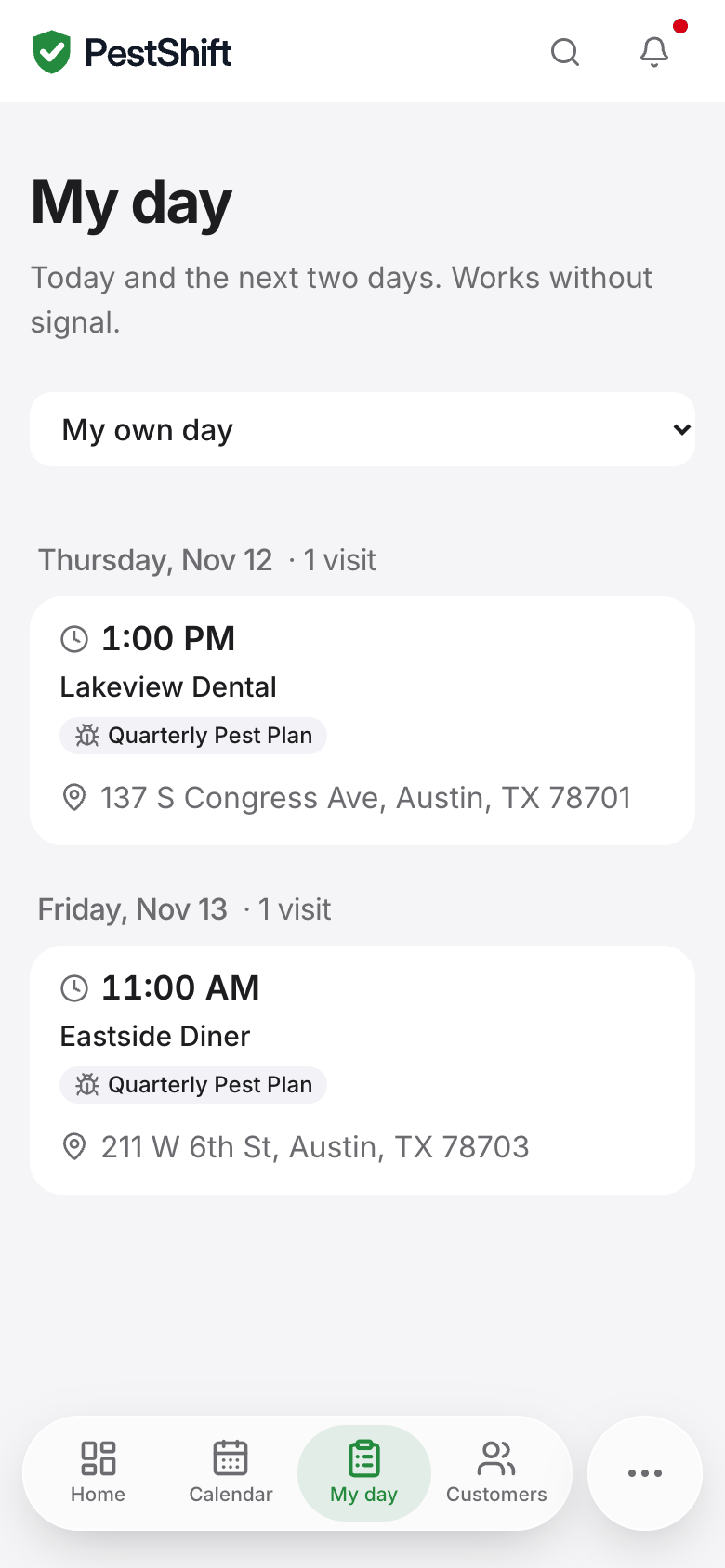 My day on a phone: today and the next two days, and it works without signal. (demo data)
From a visit the technician starts the job, then completes it with treatment notes, recommendations for the customer, the chemical record, photos and, if you turn it on, the customer's signature. If the customer pays on the spot, the tech can mark it paid by cash or check. On a service that requires a record, the phone pre-fills the last product used at that property and leaves only the amount to enter, and by default the job cannot be completed until the record exists.
Offline, once My day has loaded with signal, the technician can still see their visits, start and complete them, fill in chemical records and add photos. Everything syncs when signal returns, and office changes made meanwhile land in a Needs review list instead of overwriting either side.
The app installs from the browser to the home screen on iPhone and Android, and owners can open any technician's day from the same screen.
Demo test: start a free trial, add one service that requires a record, and complete a visit on your own phone in airplane mode. Then reconnect and check the record on the office screen.
Fieldwork
Fieldwork is pest control software, and it puts its mobile app on every plan (Fieldwork pricing). Its homepage lists chemical tracking and device scanning in its features menu, and the page says you can "keep information like ratios available offline for your teams in the field" (Fieldwork). I did not find a page describing the full offline scope.
Demo test: ask them to put the phone in airplane mode and complete a job with a full chemical record, then scan a device, then reconnect.
GorillaDesk
GorillaDesk serves pest control and nearby trades. It lists iOS and Android apps on its website, and says you can "Track your materials and chemicals applied on the job site" (GorillaDesk). Its Pro plan adds device tracking with barcoding and a customer portal, and route optimization is on every plan, with Basic capped at 25 stops (GorillaDesk pricing). Our comparison research found it logs the EPA registration number, active ingredients, dilution rates, application method and target pest per job. Offline support was not stated on the pages I checked.
Demo test: ask them to complete a job on a phone with the chemical record left blank, and see whether the app lets it close.
Briostack
Briostack is pest-control-focused and lists iOS and Android apps on its website (Briostack). From our comparison research, it tracks chemical usage with barcode scanning, offers digital documentation with e-signatures, and submits CalAg reports directly for California operators. The same research found its technician app marketed as offline-capable for rural areas, while the Briostack pages I checked did not state offline support, so treat that as something to verify.
Demo test: ask them to scan a product barcode into a chemical record on the phone, finish the job offline, and show where that record appears in the office.
PestPac
PestPac by WorkWave lists a mobile app for technicians, a customer portal, chemical tracking and route optimization on its homepage (PestPac). Our comparison research found PestPac Mobile marketed with full offline mode for work orders, chemical logging, forms and signatures, and found state-specific compliance exports built into the platform (California and Arizona reports among the examples). For a small shop the question is whether you need the platform behind it; see PestPac alternatives.
Demo test: ask them to show the same job's chemical record on the phone and then inside the state export it feeds.
FieldRoutes
FieldRoutes is a ServiceTitan product aimed at growing subscription pest companies. Its commercial pest control page mentions defining structures on the mobile app and "pre-defined equipment and product associations, like bait to a bait station" (FieldRoutes commercial pest control). Our comparison research describes a mobile chemical-usage logging module that feeds office-side reports.
Demo test: ask them to service one bait station on the phone, from scanning or picking the station to the product applied, and show the record it creates.