
A pest control work order is the instruction sheet that sends a technician to a job: who the customer is, where the property is, when to arrive, what service to perform, how to get in, what to watch out for, and which license the job needs. It is written by the office before the visit, and everything the technician records afterwards hangs off it. The free template below has every field, followed by a filled-in example you can copy.
A work order is easy to confuse with the other paperwork in a pest control company, because they all share the customer's name and address. The difference is direction. The work order goes from the office to the technician, before the job. The documents that go to the customer come after.
How is a work order different from an estimate, service report or invoice?
| Document | Who writes it | Who reads it | When | What it answers |
|---|---|---|---|---|
| Estimate | Office or technician | Customer | Before the customer agrees | What will it cost? |
| Work order | Office | Technician | Before the visit | What do I do, where, and when? |
| Chemical application record | Technician | Your state regulator | At the application | What was applied, how much, by whom? |
| Service report | Technician | Customer | End of the visit | What did you find and do? |
| Invoice | Office | Customer | After the visit | What do I owe? |
Each customer-facing one has its own template: the estimate, the service report and the invoice. The forms overview covers which of them are legal records. The work order is the one internal document in the set, so it is the one most companies leave in someone's head.
That works with one truck. It stops working the day a second technician takes a job the owner booked, and the gate code, the dog and the customer's note about the kitchen all stay in the owner's phone.
What should a pest control work order include?
Seven blocks. If a field doesn't change the way the technician does the job, leave it out.
- Job details. Work order number, date, arrival time or window, estimated length, assigned technician.
- Customer and property. Customer name, phone, service address, property type, and whether the customer will be home.
- Access and safety. Gate codes, lockbox, where to park, pets, children, allergies or sensitive occupants, areas not to enter.
- The work. Service type (initial, routine, callback, inspection only), target pests, areas to treat, add-ons, and what the customer reported in their own words.
- Licensing and products. The license category the job needs, and any product the customer asked for or asked you to avoid.
- History. Last visit date, what was applied last time, open issues from the last report.
- Completion. What the technician must record before the job counts as done: notes, recommendations, chemical record, photos, signature.
Notice what is not on the list: the price. The technician doesn't need it to do the work, and the customer never sees the work order. If your technicians collect payment at the door, add an "amount to collect" line; otherwise keep money on the invoice.
Free pest control work order template
Copy this into a document or your notes app. Delete lines you never use, but keep the access and completion blocks.
PEST CONTROL WORK ORDER

Work order no.: ________   Created by: ____________   Date created: ________

1. JOB
Visit date: ________   Arrival window: ______ to ______   Est. length: ______
Assigned technician: ____________________
Service type: [ ] Initial  [ ] Routine (plan)  [ ] Callback  [ ] Inspection only  [ ] One-time
Part of a recurring plan? [ ] No  [ ] Yes: ____________ (visit __ of __)

2. CUSTOMER AND PROPERTY
Customer: ______________________________   Phone: ________________
Service address: _______________________________________________
Property type: [ ] House  [ ] Apartment/condo  [ ] Commercial: ____________
Customer home during visit? [ ] Yes  [ ] No  [ ] Unknown

3. ACCESS AND SAFETY
Gate / door code: ____________   Lockbox: ____________
Parking: ____________________________________________
Pets on site: ________________  Secured? [ ] Yes  [ ] No
Children, allergies, sensitive occupants: ______________________
Areas NOT to enter or treat: __________________________________

4. THE WORK
Target pests: _________________________________________________
Customer's report (their words): ______________________________
Areas to treat: [ ] Exterior perimeter  [ ] Interior  [ ] Garage
                [ ] Attic  [ ] Crawl space  [ ] Yard  [ ] Other: ______
Add-ons: ______________________________________________________
Inspection required before treating? [ ] Yes  [ ] No

5. LICENSING AND PRODUCTS
License category required: ____________________
Technician holds it, current on visit date? [ ] Yes  [ ] Check
Products requested or to avoid: ______________________________

6. HISTORY
Last visit: ________   Last technician: ____________
Applied last time: ____________________________________________
Open issues from last report: _________________________________

7. COMPLETION (technician fills in on site)
Time in: ______   Time out: ______
[ ] Treatment notes written
[ ] Recommendations for customer written
[ ] Chemical application record completed (if any product applied)
[ ] Photos taken (before / after)
[ ] Customer signature (if required)
[ ] Payment collected: [ ] N/A  [ ] Cash  [ ] Check
Follow-up needed? [ ] No  [ ] Yes: ____________________________

Technician: ____________________   Date: ________
Two fields people skip and regret:
- Customer's report, in their words. "Ants on the kitchen counter every morning near the window" tells the technician where to start. "Ants" doesn't.
- License category required. The office knows the job is a termite treatment when it books it. The work order is where that turns into "this technician must hold the right license", before the truck leaves, not after.
A filled-in example
Here is the same template filled in for a routine visit on a quarterly plan. The details are made up.
PEST CONTROL WORK ORDER

Work order no.: 2047   Created by: Office   Date created: Nov 3

1. JOB
Visit date: Nov 11   Arrival window: 8:00 to 10:00   Est. length: 45 min
Assigned technician: Tech 2
Service type: [x] Routine (plan)
Part of a recurring plan? [x] Yes: Quarterly general pest (visit 3 of 4)

2. CUSTOMER AND PROPERTY
Customer: Homeowner (see customer record)   Phone: on file
Service address: on file
Property type: [x] House
Customer home during visit? [x] No

3. ACCESS AND SAFETY
Gate / door code: side gate, code on file
Parking: street, not the driveway
Pets on site: one dog   Secured? [x] Yes, inside during exterior work
Children, allergies, sensitive occupants: none reported
Areas NOT to enter or treat: vegetable bed on the south side

4. THE WORK
Target pests: ants, spiders
Customer's report (their words): "Ants by the back door again since the rain."
Areas to treat: [x] Exterior perimeter  [x] Garage
Add-ons: none
Inspection required before treating? [x] Yes, back door threshold

5. LICENSING AND PRODUCTS
License category required: General Pest
Technician holds it, current on visit date? [x] Yes
Products requested or to avoid: avoid treating near vegetable bed

6. HISTORY
Last visit: Aug 12   Last technician: Tech 2
Applied last time: exterior perimeter, same product as usual
Open issues from last report: mulch against foundation at back door

7. COMPLETION
(left blank for the technician)
The example shows the point of the history block: the open issue from last time (mulch at the back door) is probably the reason for the ants this time, and the technician knows that before getting out of the truck.
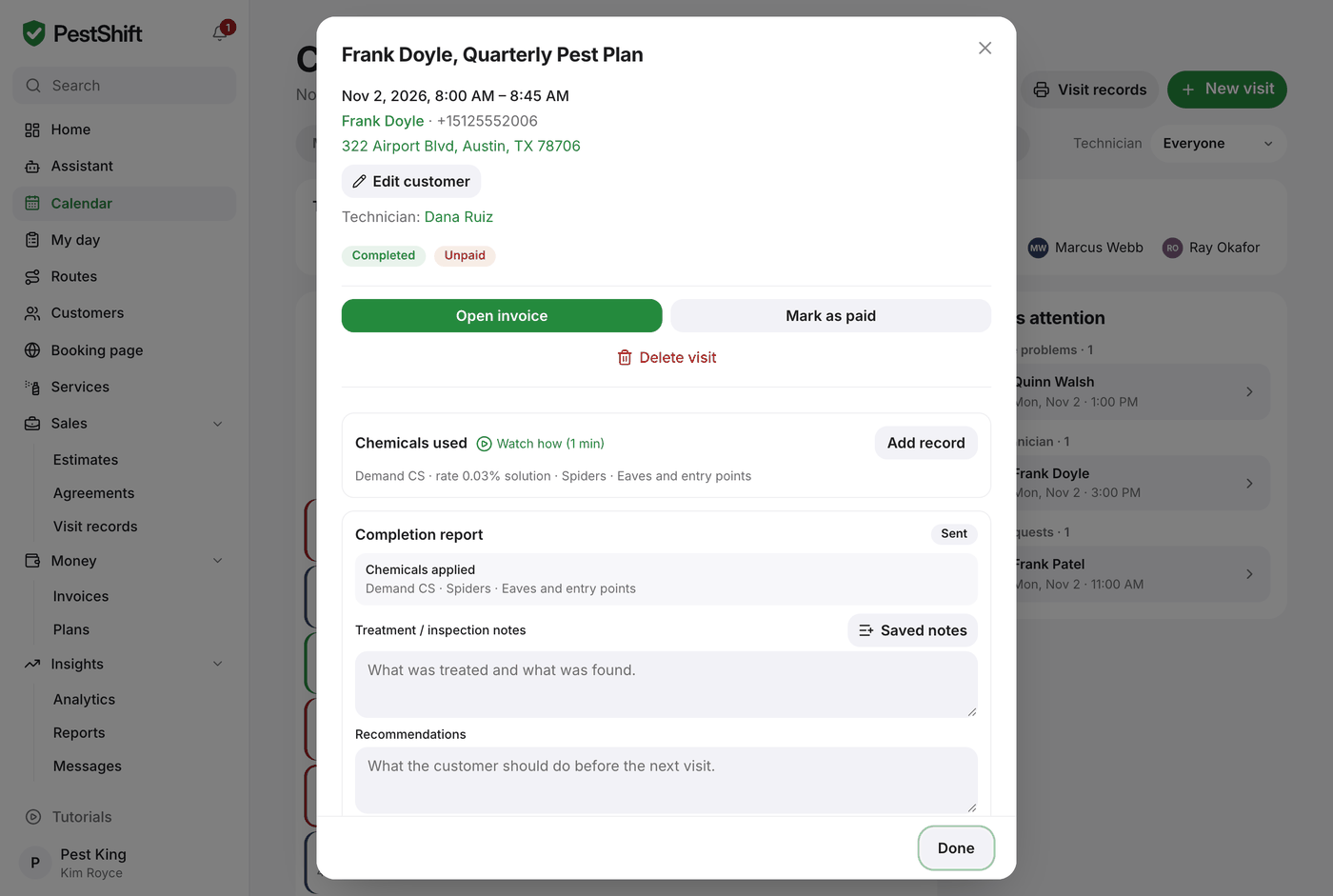 A visit opened from the PestShift calendar: the work order and its result in one window. (demo data)